2024–present — Case study
Agentic assisted dev project
Dev project at Airbus Geo (Toulouse) assisted with AI agents.
- Role
- Solo developer
- Year
- 2024–present
- Stack
- PythonGeminiRabbitMQDockerKubernetesGitlab CI/CDVaultS3HelmGraphRAG
Overview
In a team managing Earth-imagery satellite operations at Airbus Geo (Toulouse), I built a Python service that replaced their crontab and manual VM ops with a containerized, CI/CD-deployed platform on OpenShift. Over two years, I evolved it into an agent-assisted development stack (Gemini + GraphRAG + custom skills and sub-agents) that ships features autonomously while keeping daily token usage under 1% of quota.
TL;DR
- Rewrote a team's crontab + manual ops into a containerized Python service (OpenShift + GitLab CI/CD + Vault + Helm).
- Onboarded LLM agents (Gemini) with a custom skills / sub-agents architecture.
- Cut per-feature token cost via context discipline, GraphRAG retrieval (Codegraph), and tool-output compression (rtk).
- Currently building a stats-tracker hook and a LangGraph-style backtracking harness.
The journey
Phase 1 — Auditing the legacy scripts
Before I arrived they were either running tools via a crontab on a VM or by hand when some tasks weren't "cron possible". One of those tasks was to save their context (logs, database states, ...) in case something went wrong and they needed a previous working state to either roll back to or to check the state before the error occurred. To do so they had to connect to their VM, run several commands one after another, check that everything was going okay between each command, and then save this big context on a separate NFS. All this took around 30 minutes to 1 hour depending on the size of the context. They had multiple tasks like this one, daily or weekly, that consumed a lot of time they could have used better.
When I arrived I audited all those manual tasks and cron scripts. None of them were saved or tracked anywhere — if a script got deleted by accident, the backup was gone and all the logic behind it with it. I thus started to develop a software that would pack up all those tools (rewrite them in python), orchestrate, deploy and track them. I had this project hosted on a private gitlab repository that I installed directly on their VM to then run via a bash command
python3 mission-tool-manager.py save-context arg1 arg2 ...Or in a crontab
# execute the save context tool twice per day, once at 8AM and once at 8PM
* 8,20 * * * python3 mission-tool-manager.py save-context arg1 arg2 ...
Over time, I added more and more tools as new needs appeared during the mission — running a SQL query once per week and sending
the results by email in CSV format, or using RabbitMQ to send files to a remote folder via FileTransfer or s3cmd.
Before vs after, on the save-context task:
before: ssh VM → cmd1 → check → cmd2 → ... → save to NFS (30–60 min, error-prone)
after: python3 mission-tool-manager.py save-context (1 command, tracked)
Phase 2 — Containerizing + CI/CD
At some point, having the software directly on their VM started to feel suboptimal. This is where I started my very first
DevOps journey. Luckily there was a DevOps team in the building whose objective was to spread the DevOps mindset (a lot of teams
weren't using CI/CD to maintain and deploy their software). Since I was alone on my project, I was the perfect candidate to
test their DevOps teaching plan. I presented what I had built and they started showing me how to build robust CI/CD pipelines
with good practices: test, build, and deploy my software as a pod using Helm templates and a Docker image on the Openshift/Kubernetes cluster.
From there I created a Flask app in Python and hosted it behind a gunicorn proxy. The pod was then callable through curl
commands and the software could execute the tools I created directly on the cluster, without needing to go through the VM first.
From this point I felt my project was complete. I had pipelines retrieving secrets from Vault, building the Docker image, and deploying the pod and all the other resources needed (services, PVs, PVCs, network policies, ...). Because I coded the software in a modular way, adding a new tool was easy — so that's what I did, adding new tools as new needs came up.
At some point it started to feel boring as I wasn't learning new things. That's when I heard that the DevOps team who had taught me their knowledge was working on setting up Gemini CLI for us to use. That was exactly what I was waiting for. I had already been playing with Claude Code on my own, but it lacked the "professional" side — I couldn't really put it on my resume. Having Gemini here at Airbus meant I could build relevant experience.
Phase 3 — Gemini onboarding
To use Gemini in this highly secured scope, we needed to anonymize the code and make sure no sensitive information leaked into it. I split my repository in two: one for the source code, and one for the value yaml files holding the per-platform configuration (the sensitive part). Once the split was done and the CI/CD was still working, I was finally ready to start using Gemini.
During the installation tutorial made by the DevOps team, I installed several .md files in the .gemini folder of the project:
a global GEMINI.md that contained the agent's global behavior, plus various files in .gemini/skills/ — for example
scaffold-feature.md, which described how to structure a new feature (TDD-style), or debug-crash.md, which explained
how and what to analyze when a bug occurs. There were also several sub-agents in .gemini/agents/ like archivist.md,
batch_worker.md, qa_engineer.md, and so on.
I decided to try my luck with this pre-built setup — it looked promising with all the sub-agents and skills already in place. I was disappointed. When I asked Gemini to analyze a file I had written and see if it could optimize or refactor it, it started doing things that seemed ok — launching skills, spawning sub-agents — but at one point I couldn't understand what it was producing anymore. The code made no sense to me. I wiped all the changes and started over from a clean base. This happened several times.
Phase 4 — Rebuilding the agent setup
So I started asking myself what was causing all this. I noticed the "quota" — the number of tokens I was using across sessions — was growing rapidly, especially when I used several sub-agents, and especially when I used more powerful models. On the other hand, I watched the 3 hour long video from Andrej Karpathy: Deep dive into LLM like ChatGPT. That's when I understood that context matters, and it matters a lot. Keeping only the relevant information inside the window cut my token usage sharply and — more importantly — made the agent's output usable again.
The very first thing I did was build my own sub-agents and skills setup. I wiped everything and created three skills:
pytest.md— runs unit tests via thepytestmoduleblack.md— formats the code viablackpylint.md— checks for lint errors viapylint
My rule: a skill should do one specific, checkable thing. A skill that describes how to think is just wasting context space. Skills wield tools (running commands, searching the web). Behavior belongs elsewhere.
Then the sub-agents:
architect.md— designs the structure and logic, writes no code itself, only produces highly independent subtasks in aTASKS.md.code_agent.md— picks a subtask fromTASKS.md, follows its instructions, writes code TDD-style, runs the 3 skills to verify, and pushes to the remote branch.code_reviewer_agent.md— reviews the code, re-runs the 3 skills, essentially a double-check in casecode_agentmissed something.
The pipeline in one line:
architect → TASKS.md → code_agent → skills (pytest · pylint · black) → code_reviewer_agent → push
I didn't use this setup right away — there was still something running in my mind. Agents need really precise context. I kept asking myself: how can the agents navigate the code as efficiently as possible? What can help them do that? After searching around, I finally found what I was looking for: Graphify.
Phase 5 — Adding Graphify
Graphify builds a local graph that highlights connections between "topics". It creates links between them and surfaces tight neighborhoods of related code. Once the graph is built, the agent can query it via a skill:
/graphify query "what does tools_manager do?"
/graphify explain "save_context.py"
This lets the agent pull only the relevant information for what it's working on, instead of reading each file one by one
to find what it needs. I installed it on my project and initialized it with /graphify ., which builds the initial graph
and registers a Graphify skill for Gemini to use.
With this setup in place, I tried implementing a new feature. I described it to the main Gemini agent. It spawned an
architect sub-agent, which used Graphify to query and explain the tools and subjects it had to work on, then produced
a TASKS.md file with a list of subtasks. The main agent then spawned code_agents one after the other to implement each
subtask. Each code_agent used the Graphify, pytest, pylint, and black skills, corrected the code when any skill
reported errors, and finally pushed to the branch.
I was extremely happy with the result: the feature was correctly implemented, followed my coding style, and did nothing I couldn't understand.
But there were still several downsides:
- Graphify is fiddly to manage. You need a
.graphifyignore(like.gitignore) to explicitly tell it which files to skip. Otherwise it builds nodes and edges over irrelevant files (all of.gemini/, for example). - Graph updates are sketchy. Either you manually run
/graphify update .when you need it, or you set up hooks to keep the graph up to date automatically. Neither felt clean. - Graph updates can silently corrupt. Sometimes, after an update, the generated HTML visualization showed topics named just
"Topic X" instead of proper names — which is terrible for
/graphify queryand/graphify explain. Every time I noticed it, I had to ask the main agent to fix it. Really sketchy. - Sub-agents explode token usage. Each sub-agent gets its own context window, and each one has to build its own knowledge
(Graphify calls, FileSearch, reading code). Total quota grows extremely fast — especially if they all run on a pro-tier model.
Running the sub-agents on a cost-efficient model like
gemini-3.5-flashgets the work done without burning the quota.
The numbers made it obvious:
| Setup | Duration | Models | Input tokens | Output tokens | Quota used |
|---|---|---|---|---|---|
| Main agent only | 8h | gemini-3.5-flash | 47M | 100k | ~10% |
| With sub-agents | 2h | gemini-3.5-flash + gemini-3.1-pro-preview | 27.4M | 84k | >50% |
Sub-agent session breakdown: gemini-3.5-flash — 25M in / 53k out · gemini-3.1-pro-preview — 2.4M in / 31k out.
The pro model is disproportionately expensive per token. So I now use the pro model only for the architect agent — when
I need to design a complex solution and break it into subtasks — and the flash model for code_agent and code_reviewer_agent.
Sub-agents also help me keep the main orchestrator's context clean. All the raw output from pytest, pylint, black, grep,
find, etc. runs inside sub-agents and gets thrown away when they finish. The main agent, whose session can last for hours,
never sees that noise.
Phase 6 — Codegraph
Some colleagues told me about Codegraph, an alternative to Graphify focused specifically on building a knowledge graph for code. It doesn't track unrelated files like YAML, XML, or bash scripts — only my Python code, which makes it much more efficient. The graph is supposed to update automatically, but in practice I still had to set up hooks to keep it in sync (especially when adding big new features).
It works like Graphify, with skills such as:
/codegraph query "question"
/codegraph impact "module"
But it feels much lighter: the whole graph lives in a tiny local SQL database that syncs easily via the sync command, and it never creates the "Topic X" empty-name nodes Graphify sometimes produced. I switched to Codegraph and immediately noticed that my agents' output was better: they took fewer turns to produce working code because they understood the codebase better.
Even with Codegraph in place, I still wanted more token savings, so I started looking for other ways to do so.
Phase 7 — Headroom, rtk, and caveman
Searching online, I found two contenders: Headroom and rtk.
Headroom sets up a proxy that intercepts the prompt, compresses it, and forwards it to the remote LLM. Advertised savings: up to ~80% on input tokens. Unfortunately, at Airbus we go through VertexAI with a project code to reach the Gemini API — with that configuration I couldn't set Headroom up properly and had to abandon it. On my next project, I'll do the setup work required to actually test it.
rtk works similarly, but on the tool side: it creates a proxy that intercepts command outputs and compresses them by up
to 90% before handing them back to the LLM. This matters more than it sounds — when the agent runs git diff, grep, cat,
or any similar command, the raw output can be tens of thousands of tokens. A single git diff can dump thousands of tokens
into the context window, and every subsequent API call in the session pays for those tokens again in the input. rtk drastically
cuts that noise, resulting in a net gain in billed input tokens. It even ships a /rtk gain skill that shows exactly how much
was saved on each command run.
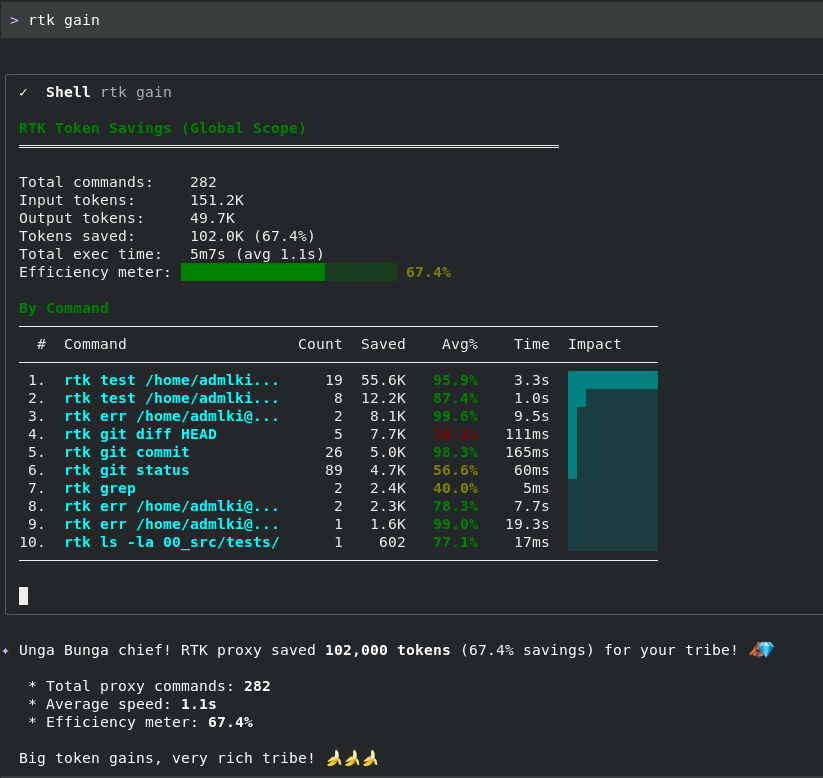
On my project, /rtk gain reports 67.4% average savings across 282 commands — 102K tokens shaved off in a single work
session. The breakdown by command is telling: rtk test calls save ~95% each, rtk err calls ~99%, rtk git status (the
most-called command at 89 runs) saves ~57%. The heavy hitters aren't the fancy commands — they're the ones the agent runs
constantly.
Finally, an honorable mention: Caveman. It makes the agent speak in "caveman" style (visible in the "Unga Bunga chief!" line at the bottom of the rtk screenshot above), cutting filler words and reducing output tokens — which matters, because output tokens are the expensive ones. I only recommend it for personal use — I don't think a chatbot that speaks like a caveman would go over well with customers (though who knows). On top of that, working with a caveman agent is genuinely fun, and it even boosted my productivity because I was in a good mood.
At a glance:
| Tool | Compresses | Advertised savings | Status |
|---|---|---|---|
| Headroom | Input prompts | ~80% on input tokens | Blocked by VertexAI setup |
| rtk | Tool command outputs | ~90% on tool outputs | In use |
| Caveman | Agent output style | Reduces output tokens | Personal use, fun |
Coming next
That's where my journey stands for now — but I'm still looking for ways to squeeze token usage further.
A stats-tracker hook
I'm currently building a script that logs every token statistic at each user prompt. It's triggered by an AfterAgent hook
that runs each time the agent responds. I called it stats-tracker and it logs four things:
General token stats. A summary of the session so far: total LLM calls, total input tokens, total cached tokens, total output tokens, and current context size. This matters because cached tokens are much cheaper than "active" ones. Active tokens = new tokens the LLM sees for the first time (billed at full input price). Once seen, they're cached server-side, because every subsequent prompt in the session carries them as base context. Cached tokens are still billed, but at a heavy discount. Example: 5M input tokens with 4.7M cached means only 300k are billed full price; the other 4.7M are billed at roughly 70% off. Lets me spot exactly where the bill is going and where to make improvements.
The user prompt that triggered the hook, and its size in tokens. At first the prompt is small — around 30 tokens. But as the session grows, the accumulated context is prepended to each prompt, so a single prompt can balloon to thousands of tokens. When I see prompts reaching those sizes, I know it's time to compact the session or start a fresh one.
Execution flow, step-by-step. Tracks the agent's internal reasoning and every tool it calls, every API call it makes. It shows how many output tokens the LLM produced and what's billed as output vs input. Distinguishing between these matters — during a turn, the LLM can either produce output tokens directly (answering the user), or call a tool (e.g. a bash command to read a file). The tool's output is then fed back as input tokens on the next API call. Based on that new information, the LLM either calls another tool or produces the final answer. This section lets me see where output tokens are being produced and what decisions led there — and whether the agent went down a weird reasoning path and lost track.
Total billed tokens. A final rollup for the prompt: number of API calls made, cached input tokens (calls × base context), active input tokens (new prompts and tool responses), output tokens generated (should match the previous section), and total processed tokens.
Here's what a real log looks like for a single agent turn:
====================================================================
[2026-07-06T16:18:38.786Z] Hook Event: AfterAgent
----------------------- GENERAL TOKEN STATS ------------------------
Model Name           | Calls | Input     | Cached    | Output
--------------------------------------------------------------------
gemini-3.5-flash     | 46    | 2.69M     | 2.29M     | 31.8K
--------------------------------------------------------------------
Base Context         | 72K
--------------------------------------------------------------------

--------------------------- USER PROMPT ----------------------------
Prompt Tokens        | 8.1K [~41 (human prompt) + ~8.1K (injected context)]
--------------------------------------------------------------------
In the USER PROMPT section you can only let (injected context)
without the "file tree, rules ... etc". In EXECUTION FLOW section
you can remove the note on Chars/4
--------------------------------------------------------------------

------------------- EXECUTION FLOW & STEP-BY-STEP STATS --------------------
LLM Calls Summary    | Total LLM Calls: 6 (With Tools: 5, Pure/Reflect: 1)
Billed Output Tokens | Generated by LLM: 5.4K (Exact billed tokens)
Tool Responses Size  | Individual Tools Run: 5 | Est. Input Added: 826
                     | *Causality: Each 'Tool Run' is the execution and output of the tool
                     |             requested by the 'LLM Call' directly above it.
                     | *Note: Each 'LLM Call (Billed)' is the output of the LLM itself (e.g. thoughts
                     |        or the tool request arguments), NOT the tool's execution result.
                     | *Note: Each 'Tool Run (Est.In)' is the actual output of the tool run
                     |        which is sent back as user message (input) for the next step.
----------------------------------------------------------------------------
Timestamp  | Type     | Tokens/Size    | Step/Details
----------------------------------------------------------------------------
16:17:57   | LLM Call | 164 (Billed)   | LLM Tool Call
16:17:57   | Tool Run | 138 (Est.In)   |  ↳ Topic: "Simplify prompt token labels..."
16:18:13   | LLM Call | 4.5K (Billed)  | LLM Tool Call
16:18:13   | Tool Run | 495 (Est.In)   |  ↳ WriteFile: .gemini/hooks/stats-tracker.js
16:18:17   | LLM Call | 70 (Billed)    | LLM Tool Call
16:18:17   | Tool Run | 21 (Est.In)    |  ↳ Shell: node -c .gemini/hooks/stats-tracker.js
16:18:20   | LLM Call | 74 (Billed)    | LLM Tool Call
16:18:23   | Tool Run | 42 (Est.In)    |  ↳ Shell: ./.gemini/skills/pytest/scripts/run_pytest.sh
16:18:35   | LLM Call | 133 (Billed)   | LLM Tool Call
16:18:35   | Tool Run | 130 (Est.In)   |  ↳ Topic: "Final label simplifications and notes cleanup..."
16:18:38   | LLM Call | 374 (Billed)   | LLM Response
----------------------------------------------------------------------------

----------------------- TOTAL BILLED TOKENS ------------------------
API Calls (turn)     | 6 calls
Cached Input         | 464.1K (6 calls x 72K base context)
Active Input         | 42.4K (new prompts + tool responses)
Output               | 5.4K (model generated responses)
Total Processed      | 511.9K
====================================================================
Two things jump out even from this one turn:
- Cached input dominates. 464.1K cached vs 42.4K active — the cached share is ~91% of what's billed.
- The
WriteFilestep billed 4.5K output tokens. That single tool call is the majority of this turn's output. Knowing which step is generating the tokens is what lets me trim behavior — for example, splitting big writes across smaller edits, or asking the agent to produce a plan before generating the full file.
After that: checkpoints + backtracking
Once the hook is done, the next thing I want to try is a checkpoint harness like LangGraph. The idea: if the agent goes down a bad reasoning path — dead end, broken code — I want to rewind to a prior checkpoint, tell the agent not to take that path because it led to X and Y, and let it try another. This should save context space and, more importantly, improve context quality: rolling back to a checkpoint erases all the context accumulated during the wrong path.
Without this, telling the agent "revert everything you did, it doesn't work" restores the code but leaves the context polluted by the wrong turns, errors, and false conclusions. Bad information in the context biases every subsequent decision — exactly what I want to avoid.
What I took away
Two years of iteration compressed into a handful of rules I now trust:
- Skills should be atomic tool-invocations. Behavior belongs in agent instructions, not skills.
- Context is the constraint. Everything else — model choice, sub-agents, retrieval — is downstream.
- Retrieval unlocks code navigation. Without a graph (Codegraph), agents brute-force by reading files.
- Match the model to the sub-agent's job. Reserve pro-tier for planning; use flash for coding and reviewing. Same pipeline, a fraction of the cost.
- Sub-agents protect the main context. Isolate noisy tool output inside short-lived sub-agents so the orchestrator's session stays clean over long hours.
- Fresh sessions can beat manual compaction. Cheap, clean, effective.
- Token optimization compounds. Proxies (rtk, Headroom) layered on top of context discipline multiply the savings.
Next project
Agentic assisted dev project→